Choosing a 3D room planner is really a choice about your output. Some tools are built for quick consumer layouts, some for dealer sales, some for photorealistic client visuals. Below is an honest look at the most-used room planners in 2026, what each does well, where it falls short, and who it fits best.
We have kept this practical. Every tool here is a real, capable product. The right one depends on the work you actually do.
Coohom
A cloud-based design platform with a large furniture catalog, an AI decorator, and fast cloud rendering up to 4K and beyond. It is popular with designers, furniture brands, and homeowners who want quick, shareable visuals.
Best for: Teams that want speed and a big model library without heavy hardware. Watch out for: Rendering runs in the cloud, so final quality depends on processing time and your plan's render allowance rather than your own machine.
pCon.planner
A long-established desktop tool with the deepest dealer and configurator ecosystem in the furniture industry. Hundreds of manufacturers publish configurable, priced product data into it, which makes it a default for furniture dealers and space planners.
Best for: Furniture dealers and manufacturers who need accurate, configurable, priced product planning. Watch out for: It is Windows-only, and its visuals come from offline and batch rendering rather than live, interactive rendering. The interface reflects its long history.
Foyr Neo
A cloud, AI-assisted tool that combines planning, modeling, rendering, and presentation. It markets fast photorealistic renders at high resolution and includes AI layout and text-to-design features.
Best for: Interior designers who want an all-in-one workflow with AI help. Watch out for: Rendering is cloud-based and uses render credits, so heavy output adds cost, and it needs a steady connection.
Planner 5D
A freemium tool across web, desktop, and mobile with an easy interface and a large catalog. It is widely used for personal projects and early-stage concepts.
Best for: Hobbyists, students, and quick layout ideas, especially on tablet. Watch out for: Rendering and presentation are lighter than professional tools, so it is less suited to client-grade or catalog output.
Cedreo
An online home design tool focused on drawing floor plans and generating 3D renderings quickly. It is strongest for home builders and remodelers presenting concepts to clients.
Best for: Residential builders and remodelers who need fast plans and presentation visuals. Watch out for: It is built around residential workflows, and rendering quality and furniture depth are more limited than top-tier visualization tools.
SketchUp
Not a dedicated room planner but a general 3D modeler that many architects and designers use for interiors. It is flexible and has a huge ecosystem.
Best for: Architects and designers who want full modeling control. Watch out for: Photorealistic rendering is not built in, so you add a third-party render engine and plugin, plus the learning curve that comes with it.
Witmodel
Witmodel is a professional desktop application that pairs a full 3D room planner with a real-time path-tracing render engine, which is the combination no other tool on this list offers. The same physically based render quality is available both in the planner and in studio product-render setups, with no render farm and no render queue. You can import a raster, PDF, or DWG plan, draw the room in minutes, present a live render to the client, then push the same scene to a 4K path-traced render. Geometry exchanges both ways with 3ds Max and SketchUp.
Best for: Furniture brands, in-house 3D artists, interior designers, architects, and e-commerce teams who need photorealistic output and a path into professional 3D tools. Watch out for: It is built for professional B2B work, so it is more than a homeowner needs for a single room.
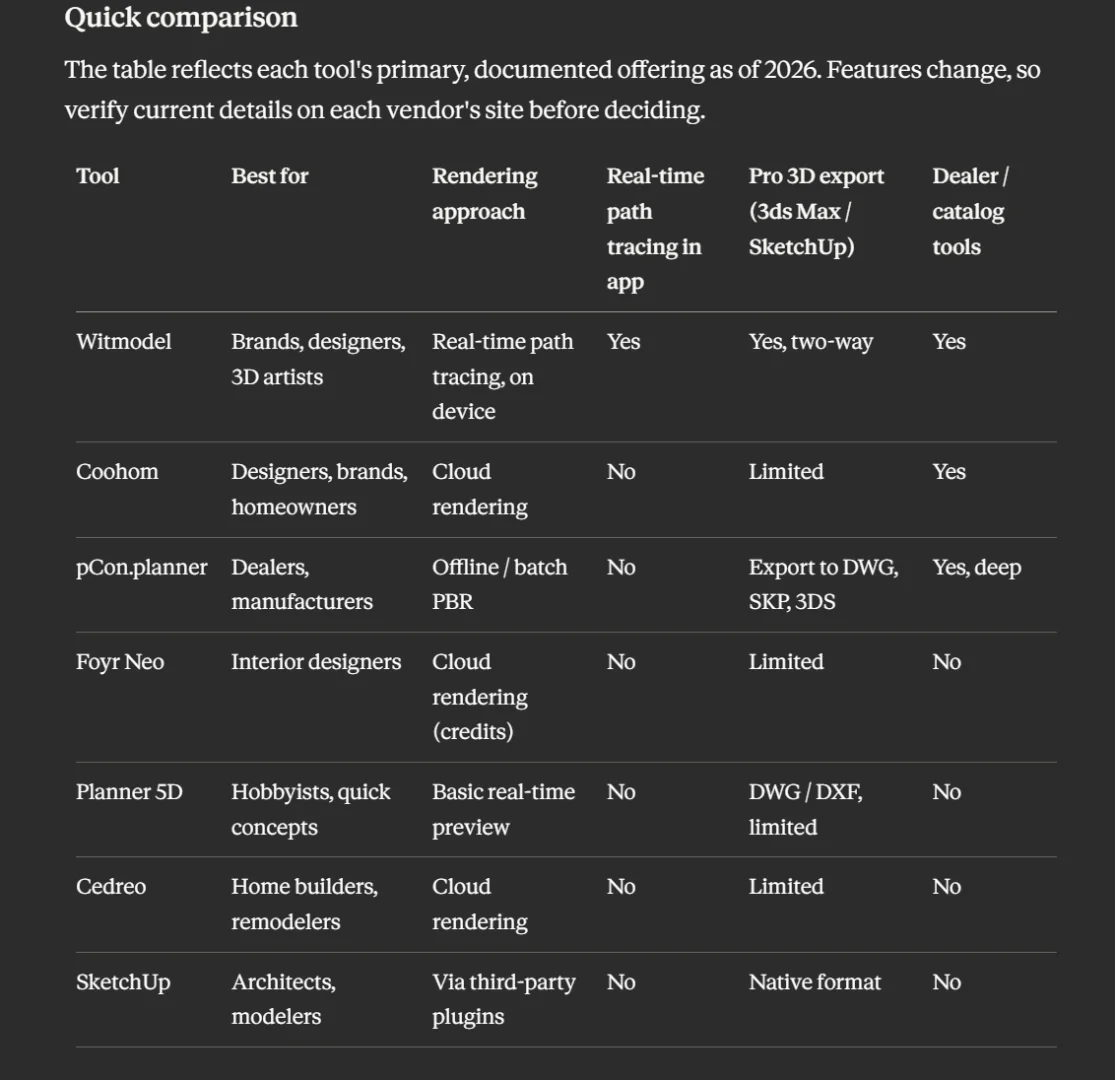
Quick comparison
The table reflects each tool's primary, documented offering as of 2026. Features change, so verify current details on each vendor's site before deciding.
How to choose
Match the tool to the job:
For quick personal layouts, Planner 5D or Cedreo are easy starting points.
For an AI-assisted design and presentation workflow, Foyr Neo or Coohom fit well.
For furniture dealer and configurator sales with manufacturer data, pCon.planner is the established choice.
For full modeling freedom, SketchUp with a render plugin.
For real-time path-traced photorealism in a single tool, with a clean path into 3ds Max and SketchUp, Witmodel is built for exactly that.
If your work lives or dies by the quality of the final image, the question is simple: do you want to wait on a render queue, or see final quality as you design?
Try it free: witmodel.com design a room and render it in 4K, no credit card required.
Follow Witmodel:
- Instagram → instagram.com/witmodel
- LinkedIn → linkedin.com/company/witmodel
- YouTube → youtube.com/@witmodelAI
- Pinterest → pinterest.com/witmodels
We're just getting started and we'd genuinely like to hear what you're working on. What's the part of your visualization workflow you'd most want to make instant?